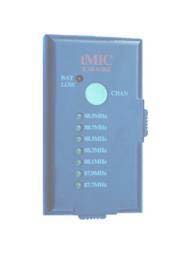
Product Description
|
|
tMIC Karaoke is a combo of Karaoke machine,
wireless microphone and FM transmitter.
|
| As a
Karaoke machine: tMIC Karaoke allows you to sing along with the music
of your iPod, MP3, CD, cassette, PC, laptop or PDA. Just connect tMIC
Karaoke to the headphone jack of your imusic device by using the cable included.
Turn on Karaoke. Tune the stereo to a clear FM frequency.
Sing to the built-in Mic or an external Mic. Start to enjoy the
digital MP3 music mixed with your voice from the high-quality car stereo with full sound and
convenience. |
| As a FM Transmitter: tMIC
Karaoke allows you to play portable music device through car stereo or any FM stereo easily. Just connect tMIC
Karaoke to the headphone jack of your iPod, MP3, PSP, CD, cassette, PC, laptop or PDA by using the cable included. Tune the stereo to a clear FM frequency. Start to enjoy the digital music from the high-quality stereo system with full sound and convenience.
|
| As a wireless microphone: You can use tMIC
Karaoke in retail store, classroom, conference room or any gathering place quickly and easily. Just tune a portable FM stereo to a clear FM frequency. Talk to the built-in microphone or an external microphone plugged-into
tMIC Karaoke. The FM stereo starts to broadcast your speech with full clarity and convenience.
|
|
Great convenience
 | Switch from wireless microphone to music playing when a music device is
plugged-in |
| Disable built-in Mic when external Mic is
plugged-in |
| Low-battery LED alerts running out of
battery |
| Car cigarette adapter preserves your
batteries |
| Power
ON/OFF switch prevents battery current leaking |
| Channel
pushbutton allows you to select channel easily while driving |
|
Features
|
| Karaoke
ON/OFF switch |
| Built-in microphone |
| Connector for external head-worn microphone |
| Built-in antenna for extended working range and
excellent music quality |
| Ultra-light for portability |
| Ultra-small
– just 3.2”x1.8”x1.2” (81mm x 45mm x 31mm) |
| High-clarity, full-stereo sound |
| Powered by a 9V battery or external power supply |
| Power
ON/OFF switch |
| Low power LED indicator |
| Up to 20 hours battery life |
| 7 FM channels available |
| Microphone
frequency: 100Hz -- 16000Hz |
|
Applications
|
| Scene 1:
Karaoke inside car.
Connect tMIC Karaoke to the headphone jack of your MP3 player (or CD
player) via the cable. Select one FM channel by pushing the button on tMIC
Karaoke. Tune your car stereo to the same FM channel. Turn on Karaoke.
Sing to the built-in Mic. Start to enjoy the
digital MP3 music mixed with your voice from the high-quality car stereo with full sound and
convenience. |
| Scene 2:
Karaoke at home.
Connect tMIC Karaoke to the headphone jack of sound card on your PC (or
the jack of MP3 player) via the cable. Select one FM channel by pushing the
button on tMIC Karaoke. Tune your home radio stereo to the same FM
channel. Turn on Karaoke. Sing to the built-in Mic. Start to enjoy the
digital MP3 music mixed with your voice from the
high-quality home stereo system without interruption. |
| Scene 3: In a retail
store,
the salesman pushes the button on tMIC Karaoke to select one FM channel.
Turn on Karaoke. Connect tMIC Karaoke to the headphone jack of your MP3 player (or CD
player) via the cable. Tune the mobile radio stereo at front door to the same FM channel. Talk to
the microphone of tMIC Karaoke. The radio stereo system starts to
broadcast his sales promotion mixed with background music to the shoppers passing by. |
| Scene 4: In a school
classroom, the teacher pushes the button on tMIC Karaoke to select one FM
channel. Tune one or two mobile radio stereo to the same FM channel. Talk to
the microphone of tMIC Karaoke. The radio stereo systems start to
broadcast the teacher’s speech to the whole class with full clarity and
convenience. |
| Scene 5: In a company’s conference
room, the chairperson pushes the button on tMIC Karaoke to
select one FM channel. Tune one or two mobile radio stereo to the same FM
channel. Talk to the microphone of tMIC Karaoke. The radio stereo systems
start to broadcast his speech. |
| Scene 6: In a
picnic, the host pushes the button on tMIC Karaoke to
select one FM channel. Turn on Karaoke.
Connect tMIC Karaoke to the headphone jack of your MP3 player (or CD
player) via the cable. Tune a mobile radio stereo to the same FM
channel. Talk or sing to the microphone of tMIC Karaoke. The radio stereo
system
starts to broadcast his voice mixed with background music. |
Consumer Benefits
|
| Karaoke
anywhere and no need of heavy equipment
|
| Enjoy
MP3 digital music from high-quality home radio stereo
|
| Driving
while listening non-stop digital music from high-quality car stereo
|
| Continues
play of digital music without interruption
|
| Set-up
the link between music player and stereo system without wires
|
| True
stereo sound with high-clarity
|
| Affordable
high quality Karaoke machine and wireless microphone system
|
| Availability
of both built-in microphone and external microphone – allowed to be used
in many occasions
|
| Easy
set-up of a wireless system – the only other equipment needed is a
standard stereo radio
|
| 7 FM channels available – guarantee of channel clarity
|
| Select
the FM channel by pushing the button only – easy to use and user friendly
|
| Both
battery and external power supply available – no need to worry about
running out of battery when the external power supply is used
|
|